
AniHelp
The system enables quick reporting, locating nearby available helpers, and direct communication for immediate support.
A simple, fast, and mobile-friendly tool designed for
real - time rescue operations.
About The Project
A volunteer management app for rescuing injured animals. It enables quick reporting of animals in distress, locating nearby volunteers, and sending direct messages for immediate help. The focus is on a simple, accessible, and mobile - friendly experience for emergency situations.
The Problem
Currently, there is no simple and fast solution for bystanders to report an injured animal and receive immediate help from nearby volunteers.
Reporting often relies on social media or WhatsApp groups, which leads to delays, confusion, and loss of critical information.
In emergencies, every minute counts, and the lack of a centralized volunteer management system makes coordination difficult and reduces rescue efficiency.
The Goal
-
Quick Reporting - allow anyone to report an injured animal with one tap.
-
Instant Connection - link bystanders with nearby available volunteers.
-
Critical Info - provide real-time data such as location, availability, and equipment.
-
Efficient Coordination - improve task distribution among volunteers for faster rescues.
-
User Experience - design a simple, intuitive interface for emergency use.
Design Process
Competitor Analysis Conclusions
Things to avoid:
-
Information overload - overcrowded screens with text-heavy data that can’t be scanned quickly.
-
Too many clicks - simple actions requiring multiple screens.
-
Flat alerts - alerts without prioritization, making it unclear what’s urgent.
-
Old-fashioned layouts - outdated table-heavy designs instead of intuitive layouts.
-
Desktop-only mindset - systems not optimized for tablet or mobile use.
-
Hidden KPIs - key performance indicators buried deep in screens instead of highlighted upfront.
Things to implement:
-
Volunteer-to-organization connection - the platform successfully connects users directly with rescues, which is its strongest value.
-
Case and task management - clear processes for creating, assigning, and completing missions.
-
Mobile and web support - accessible both in the field (volunteers) and for admin work.
-
Visual tools - allow fast sharing of photos/videos of animals, adding transparency.
-
Active community - widely used by volunteers and rescues in the U.S., with a reputation for reliability.

Targt Users
The System Is Designed For
Volunteer
-
Name: Daniel Levi
-
Profile: 32 years old, animal lover and volunteer at a local rescue.
-
Need: Wants to receive alerts about injured animals nearby so he can help.
-
Goal in the app: See new reports on the map, pick a mission based on availability, and close cases once he handles them.
-
Challenge: Needs clear information (location, picture, urgency level) to know quickly how he can help.
Bystander
-
Name: Maya Cohen
-
Profile: 25 years old, student, lives in a big city.
-
Need: Saw an injured cat on the street and wants to quickly report it via her phone.
-
Goal in the app: Take a photo, share exact location, and feel reassured that a volunteer is on the way.
-
Challenge: Has no medical knowledge, needs a simple interface with a clear SOS button.
User Flow
.png)
Mid Fidelity Wireframes


Colors & Typography
The screen uses clean, bold typography for clear hierarchy and easy navigation.
A balanced palette of red, blue, and neutral tones guides attention and emotion.
Red signals urgency, blue conveys trust, and neutrals keep the interface clean and calm.
Final Design
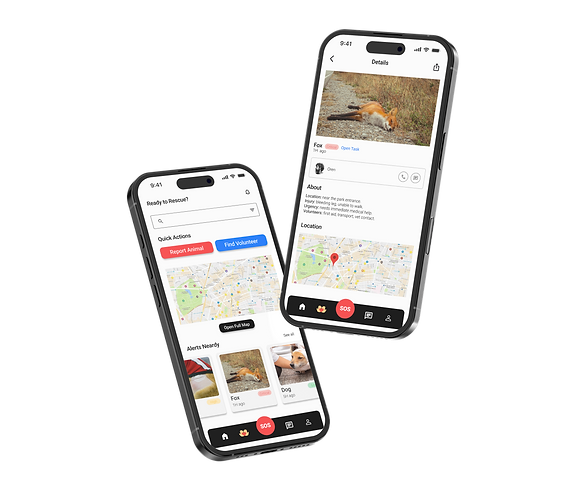
Home Screen - The screen presents a user - centered interface with a central map showing the user’s location, reported injured animals, and available volunteers nearby.
Three prominent buttons enable quick actions: Report Animal, Find Volunteer, and an SOS call for immediate help.
The minimalist design and strong color contrast highlight priorities and support intuitive, fast responses in emergency situations.

Pet Details Screen - The screen displays the Details page for a reported injured animal.
At the top, there’s an image of the animal (in this case, a fox) along with key information -
the animal’s name, emergency status (Critical), task status (Open Task), and time since the report.
Below that, there’s a card showing the reporter’s information, including a profile picture, name (Oren), and quick contact options via phone or message.
In the About section, essential details about the incident are listed:
-
Location – near the park entrance
-
Injury – bleeding leg, unable to walk
-
Urgency – needs immediate medical help
-
Volunteers – first aid, transport, vet contact
Further down, a map pinpoints the exact location of the animal, helping volunteers reach the spot easily.

Report Screen - The screen displays the Report an Animal page, where users can quickly and clearly report an injured animal.
At the top, there’s a field to select the type of animal (Dog, Cat, or Other) to make the report more specific.
Below that is a Description field for entering key details such as location, type of injury, urgency level, and the kind of volunteer help needed.
The Date & Time field allows users to record when the animal was found, with an easy-to-use date and time picker.
Next, the Location field lets users search by city or postal code, while the Contact Info section provides space to add a phone number for follow-up.
Finally, there’s an Upload Photo section where users can attach an image of the injured animal for faster identification.

Find volunteer - The screen presents a clear, accessible interface designed to connect reporters with available volunteers in the area.
At the top, there’s a search bar and a prominent “I Want to Volunteer” button inviting users to join as volunteers.
Each volunteer card includes key details such as profile photo, name, rating, areas of expertise (like medical help, foster care, or field rescue),
a car icon for mobile volunteers, and a direct message option.

Chats Screen - This screen enables direct communication between users and volunteers through private messages.
It includes a search bar, a list of recent conversations showing the last message, time or date, and unread message indicators.

Profile Screen - This screen centralizes all user settings, including account details, security, and personal preferences.
It also includes sections for donations, pet preferences, accessibility, and volunteer options, along with support and feedback.


